
Keeping a Coding Agent's Context Small Between Pieces of Work
Most days I have a lot of Claude Code sessions running at once, spread over several terminal windows and working in different repos. With that many on the go, it gets hard to see which ones are waiting on me, and what each one is actually doing. That’s why I’m building pitwall, “the pit wall for your Claude Code sessions”. (The name comes from Formula 1, where the team on the pit wall doesn’t drive, but watches every car and calls the strategy.) It’s a local web UI that lists every session on my machine, wherever it was started, shows which ones need me and why, and lets me read and message those sessions, and start new ones, from one place. It also has a supervisor, a Claude Code session you talk to instead of opening each of your sessions in turn, which can summarise them, message them and start new ones once you approve.
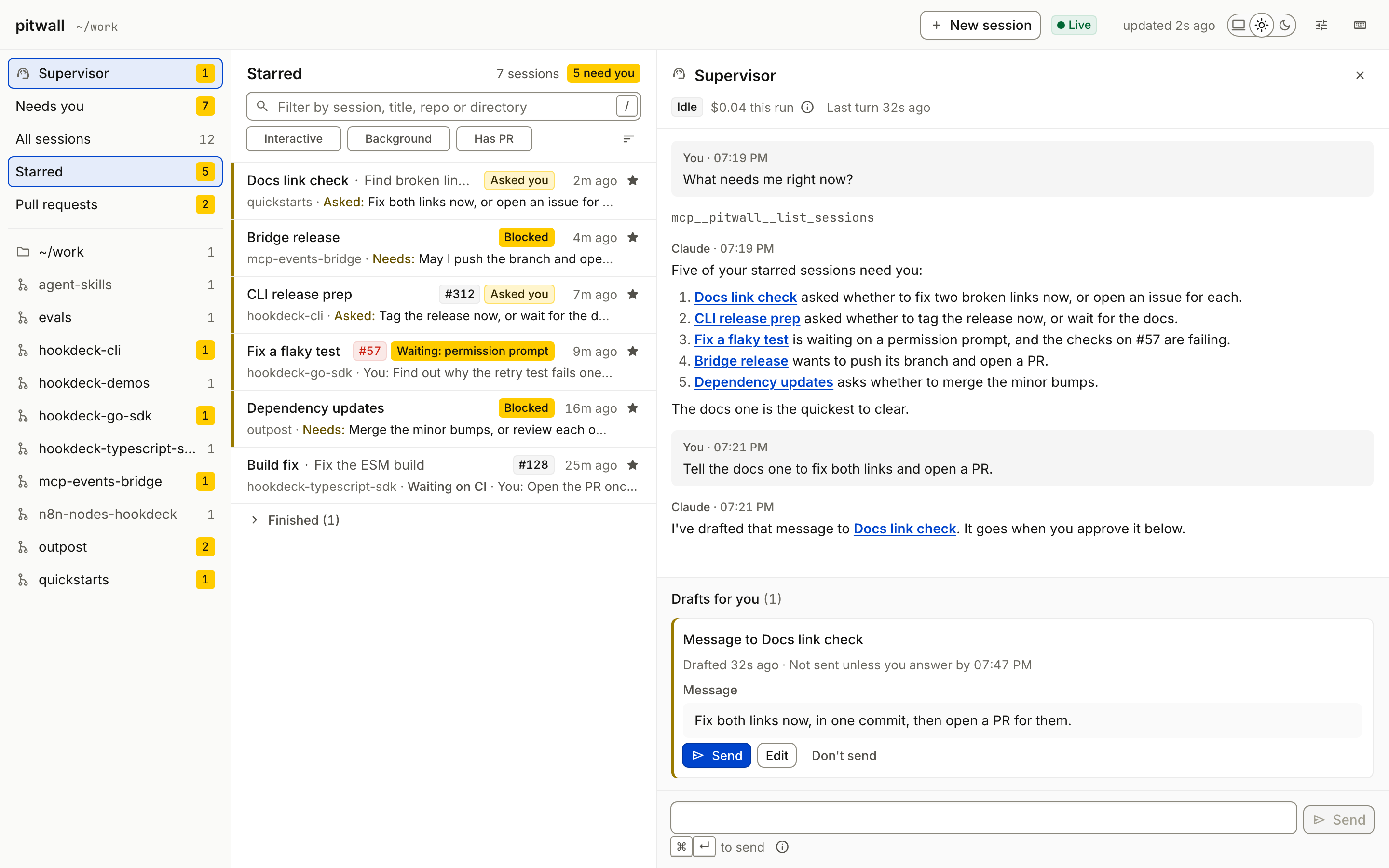
pitwall with the supervisor open. The sessions and both conversations in the screenshot are made up.
pitwall exists to make coordinating many sessions more efficient and more visible, so it seemed fair to hold the way I build it to the same standard. I’m building it with Claude Code too, and the way I work is plan-led: there’s a plan file in the repo, and a coordinating session works through the plan, handing each piece of work to a sub-agent to build or review.
Every Claude Code session I run, for pitwall or anything else, comes out of one Ultra subscription. For each of the last two weeks I’d used all of its weekly allowance by Friday, and by lunchtime this Monday I was already at around 10%, with five working days and a weekend still to go. I could have paid for extra usage. My preference was to get more out of what I already pay for, and I don’t think efficiency is only about cost. A smaller context should also mean quicker responses, and getting things done sooner.
pitwall’s coordinating session had been running for the best part of a week, across two milestones. So I asked it what felt like an obvious question: “Once a piece of work is finished, why not clear context and continue with a pointer to the plan? Are there published rules/strategies round this? Any skills we should be utilizing?”
Clearing between pieces of work turns out to be well documented, by Anthropic and by most of the other tools and practitioners I checked. The coordinating session handed that research to three sub-agents, one each for Anthropic, other tools and practitioners, and every claim below has been checked against its source. What I hadn’t thought about was the size of the plan file I’d have been pointing at.
TL;DR
- Clear between pieces of work. Anthropic’s Claude Code docs say so directly, Cline and Aider say the same in their own docs, and Codex gives you the commands for it. The reason isn’t running out of context any more. It’s that a long session pays for its whole history on every turn.
- Restart from files, not from the chat. Every source I checked, vendor or practitioner, keeps durable state in files that a fresh session reads first.
- The file a fresh session reads first has to be small. My pointer led to a 955-line, 353 KB plan. A fresh session that read it in full would have spent a lot of what clearing saved.
- So I split the plan in three: a short
NOW.mdthat every session reads first and updates before it ends, aPLAN.mdfor the living design, and an archive for finished work. - And I wrote a small
handoffskill that updatesNOW.md, commits, and tells me to/clear. There’s a sketch of a generic handoff skill at the end you can adapt.
Why Clear Between Tasks?
I’d half-assumed the reason to clear was the context window filling up. Anthropic’s best-practices page now lists “The context window is your main constraint, manage it aggressively” under advice that’s gone, because most current models have a 1M-token window and compaction happens on its own. What hasn’t gone is the cost: “Every request sends the whole conversation, so a session that’s collected three unrelated tasks re-reads all three on every turn of the fourth.”
Re-reading the history is discounted while the prompt cache is warm, but it’s still paid. A coordinating session that has been running for days drags every finished task along with it, and I suspect that was a fair share of where my Monday went.
A smaller context should be faster too, and on that point there’s direct evidence. Anthropic’s guide to reducing latency says to cut input tokens as well as output, because “The fewer tokens the model has to process and generate, the faster the response will be.” The prompt cache softens that for a long session without removing it. In Anthropic’s prompt caching announcement, a 100,000-token prompt took 11.5 seconds to the first token uncached and 2.4 seconds cached (on the Claude 3 models of the time), and once the cache expires, a long session pays the uncached time again. Manus makes the same link, calling the KV-cache hit rate (how much of the prompt the model can reuse from a previous request instead of processing it again) something that “directly affects both latency and cost”.
Getting things done sooner is a step further than a faster response. Chroma’s context rot research tested 18 models, Claude among them, and found “their performance grows increasingly unreliable as input length grows”. Anthropic’s best-practices page says /clear between tasks is still worth doing “because a focused context gets you better answers and costs less”. Better answers first time should mean fewer rounds of correction. None of these sources measured a Claude Code session like mine, so I’d call a smaller context likely to be quicker as well as cheaper, but I haven’t measured how much.
What Anthropic Recommends
Anthropic’s Claude Code docs and engineering posts recommend six things:
- Clear between unrelated work. The costs page says “Use
/clearto start fresh when switching to unrelated work. Stale context wastes tokens on every subsequent message.” It also suggests/renamebefore clearing, so you can/resumethe old session later. - Prefer a fresh session to compacting when you don’t need the history. The same page notes that
/compact“reads the conversation it summarizes, so compacting a large context is itself a large request”. Best practices adds that it’s worse once the cache has expired, and that “If you don’t need the history at all, a fresh session still costs less.” - Write the plan down, then start fresh to build from it. Best practices has you interview Claude into a
SPEC.md, then “start a fresh session to build from it, so the build begins with a clean context and a written definition of done.” - Start each session from a progress file and the git log. Anthropic’s post on long-running agents is blunt: “compaction isn’t sufficient”. Their coding agent starts every session by reading
claude-progress.txt, the feature list andgit log, works on “only one feature at a time”, and leaves a commit and a progress update behind. - Take notes outside the window. The context engineering post describes an agent “maintaining a NOTES.md file” to “track progress across complex tasks”, and frames the whole job as finding “the smallest possible set of high-signal tokens”.
- Keep the always-loaded file short. “Aim to keep CLAUDE.md under 200 lines by including only essentials”, with specialised instructions moved into skills, which only load when they’re used.
The costs page also covers the other big lever, model choice: “Sonnet handles most coding tasks well and costs less than Opus”, and model: haiku for simple sub-agent tasks. Model choice is a separate decision from clearing, and I made it in the same conversation, moving ordinary reviews and mechanical work to Sonnet. This post sticks to clearing context and to what a fresh session reads first.
What Other Tools Do
Other agent tools keep state in files and start fresh too, each in its own terms.
| Tool | What it recommends |
|---|---|
| Cline | A “Memory Bank” of markdown files, including activeContext.md (current focus and next steps, the one that changes most) and progress.md. When the window fills, you ask it to “update memory bank”, start a new conversation, then ask it to “follow your custom instructions”. Its /newtask command “works like a developer handoff”, carrying the plan, the work done, the relevant files and the next steps into a clean context. |
| Manus | “We treat the file system as the ultimate context.” Its compression is “always designed to be restorable”: drop a web page’s content but keep its URL, drop a document but keep its path. It also rewrites a todo.md as it goes, which “pushes the global plan into the model’s recent attention span”. |
| LangChain | Four buckets: write, select, compress and isolate. Isolating work in sub-agents helps, with the warning that multi-agent setups can use “up to 15× more tokens than chat as reported by Anthropic”. |
| Aider | “Break your goal down into bite sized steps” and do them one at a time, /drop files you’re finished with, and if it gets stuck, “Use /clear to discard the chat history and make a fresh start”. /tokens reports how big the context is. |
| Codex | /new starts a blank chat and /status shows context usage. Its AGENTS.md loading stops once the combined size reaches project_doc_max_bytes, 32 KiB by default. |
Codex is the only one of these tools that turns “keep the instructions small” into a hard limit, and it measures that limit in bytes, not lines.
What Practitioners Do
Geoffrey Huntley’s “Ralph” is the most radical take, and the clearest. In its purest form it’s a bash loop, while :; do cat PROMPT.md | claude-code ; done, so every iteration starts with an empty context and loads the same things: the specs and a fix_plan.md. He’s emphatic about “one item per loop”, repeating it in case you missed it, says “Your primary context window should operate as a scheduler”, and has the loop update fix_plan.md and commit when the tests pass. Because “future loops will not have the reasoning in their context window”, he has it leave notes in the tests explaining why each one exists. He’s also clear about its limits: “There’s no way in heck would I use Ralph in an existing code base”.
Harper Reed writes a spec.md, a prompt_plan.md (a series of prompts, each one a step) and a todo.md the tool ticks off, which he says “is good for keeping state across sessions”. On an existing codebase “The planning is done per task, not for the entire project”, and if he’s “blowing through tokens” he cuts what goes into the context bundle.
Jesse Vincent’s superpowers packages planning, running a plan and finishing a branch as Claude Code skills. writing-plans writes a plan “for an engineer who has not seen this codebase or this spec”, and then offers two ways to run it. Subagent-driven development is a fresh sub-agent and a fresh reviewer per task, which writing-plans describes as “Most thorough; costs a fresh context per task and per review”. Running it inline in one session is “Cheapest and fastest”. I like that it states the trade-off instead of picking for you (and, as of when I read it, recommends the expensive option).
Simon Willison passes on a tip from Jesse Vincent that’s about cost more than context: tell the main session “For all coding tasks use your judgement to decide an appropriate lower power model and run that in a subagent”. The memory file Claude saved from that prompt keeps judgement, review and synthesis in the main loop.
What Vendors and Practitioners Agree On
Anthropic, the other agent tools and the practitioners above agree on five things:
- Durable state lives in files, not in the conversation.
- Each piece of work starts in a fresh context, loading only what it needs.
- Each piece ends by updating that state, so the next session doesn’t have to work it out.
- Steps are small. One feature, one item, one bite-sized step.
- Verbose work goes elsewhere, to sub-agents or to cheaper models.
My question had already proposed the first three, so I checked pitwall against all five.
Keep the Restart File Small
Pitwall already kept its state in a plan file with handoff notes, its AGENTS.md was 136 lines (comfortably under Anthropic’s 200), and every sub-agent started with a fresh context. The coordinating session was the exception, and fixing that looked like the easy bit: clear after each merged item and tell the new session to read the plan.
The plan was 955 lines and 353,052 bytes. On the rough rule of four characters to a token, that’s close to 90,000 tokens, and a fresh session that read the plan in full would carry those 90,000 tokens into every turn that followed. Clearing would probably still have saved something, because a conversation that had run for most of a week was likely far bigger than the plan. Even so, is a restart that opens by re-reading the project’s entire history really a fresh start?
Huntley’s fix_plan.md, Cline’s activeContext.md and Manus’s todo.md are all small, current and rewritten as work moves. Mine had grown into the design document, the status board and the project history at once, and every finished milestone’s work breakdown was still in it.
Splitting the Plan in Three
I asked for the plan to be split before any more feature work started. It’s in pitwall now, from leggetter/pitwall#126 (docs: split the plan into NOW.md, PLAN.md and an archive; a handoff skill):
| File | What it’s for | Size |
|---|---|---|
NOW.md | Read first, updated last. The current milestone, open work one line each, what’s next in order, open questions in full, and links to everything else. | 52 lines, 5,196 bytes |
PLAN.md | The living design: architecture, interfaces, security, the open and upcoming milestones. | 272 lines, 49,088 bytes (from 955 lines, 353,052 bytes) |
docs/plan-archive.md | Finished milestones’ detail, moved verbatim under the same headings so old references still resolve. | 864 lines |
The first pass got PLAN.md down to 280 lines and still left it at about 88 KB. The line count had dropped by more than two-thirds while the bytes hadn’t, because the open milestone’s work-breakdown rows were single table lines, the longest running to several thousand characters. A second pass cut each row to one short line and moved the detail into the archive. If you only check the size of your pointer file one way, I’d check bytes (wc -c), not lines.
NOW.md describes itself as “a pointer, so it links to the detail instead of copying it”. Its last section, “Standing context”, is a list of links with a note on when each is worth reading: “Read these as the work needs them, not all at the start.”
The Handoff Skill
Superpowers has the most complete plan-and-handoff workflow I came across, and I was tempted to adopt it (I’d heard good things). I decided to adapt the ideas instead, at least for now, because pitwall already has a plan format and a skill tied to its own files can be much smaller. When pitwall starts its next milestone, I’d still like to plan it with superpowers’ writing-plans skill and compare the result with my own plan format.
Here’s pitwall’s handoff skill in full, .claude/skills/handoff/SKILL.md as it landed:
---
name: handoff
description: Close out a piece of pitwall work so a fresh session can start cheaply. Use when a work item or PR is finished, or when this session's context is large. Updates NOW.md, updates PLAN.md only where the design changed, commits, then tells the user to /clear.
---

# Handoff

Leave the repo so the next session can start from `NOW.md` alone. Do the steps in order, and read only what you need (AGENTS.md, "Efficiency"): `grep -n '^#'` and excerpts, never whole `PLAN.md`.

1. **Update `NOW.md`** (under 100 lines):
   - **Current milestone:** its state, and the date in "Last updated".
   - **Open work:** this item's PR or status, in one line; remove what has merged.
   - **Next, in order:** what to do next, so the next session needn't work it out.
   - **Open questions for Phil:** every pending one, in full, each with your lean. Never "see above" or "as before".
   - **Standing context:** links only. Add a link if the next session needs a new document; don't copy text in.
2. **Update `PLAN.md` only where the design changed:** a new interface, a security rule, a milestone's scope, a row in "M5 work breakdown" (or the open milestone's). Not for status; status lives in `NOW.md`. A settled decision moves to `docs/decisions.md` under its ID. Finished milestones' detail goes to `docs/plan-archive.md`, verbatim, under the same heading.
3. **Check the docs:** `NOW.md` is under 100 lines, and `PLAN.md` hasn't grown past what the change needs.
4. **Commit** with a conventional message, such as `docs: hand off after W123`. Docs only, so no tests. Use the commit attribution the session was given. Don't push or merge unless asked.
5. **End with this to the user, and nothing after it:** work is committed; run `/clear`, then start the next session with "Read NOW.md".
The skill’s counterpart is one line in AGENTS.md telling every session to read NOW.md first. The line I’d single out in the skill is “Never ‘see above’ or ‘as before’”. After a /clear there is no “above”, and an open question that only makes sense with the old conversation attached is a question nobody can answer.
Does Splitting the Plan Pay Off?
I can’t tell you yet whether splitting the plan saves anything, and it would be overclaiming to pretend otherwise. The split and the skill have only just gone into pitwall, and I haven’t yet run a full week of handing off after each piece of work. Until I have, this is a bet backed by unusually consistent advice, not a measured saving, and the same goes for my assumption that handing off makes things faster.
Claude Code agents wrote this post. pitwall’s coordinating session didn’t draft the post in its own week-long context. It started a separate background session (claude --bg) with a one-paragraph brief and none of that context, and the new session pulled its source material from the coordinating session’s transcript.
Three features planned for pitwall’s next two milestones cover model choice, handoffs and fresh sessions. Work profiles give each new session a model and effort to suit its kind of work, such as Opus for building and Sonnet for reviews. A badge flags any session whose every turn re-reads a very large context, suggesting /compact or a handoff. Batches let me give the supervisor several pieces of work, and it starts one session per piece, each with a fresh context and each waiting for my approval, then sums up when the batch is done.
Guidelines for Your Own Handoff Skill
What does your next session read before it does anything else? If you can’t answer in a sentence, list those files first. You don’t need my file layout to write your own handoff skill, and these are the rules I’d carry into another project, with a sketch at the end.
- Measure what a fresh session reads first, in bytes. Run
wc -con everything your instructions tell a new session to read. If that comes to tens of kilobytes, clearing may save less than you think, and a line count can hide it. - Separate now, design and history. Status changes every task, design changes occasionally, and history never changes. Keeping them in one file means every session pays for all three.
- Link, don’t copy. The “now” file should point at the design and the history and say when each is worth opening, so a session reads a section when the work needs it instead of everything up front.
- Write every open question in full. No “see above” and no “as discussed”, because the next session won’t have the conversation you’re about to clear.
- Say what’s next, in order. A session that has to work out what to do next will often read half the repo to do it.
- Keep status in exactly one place. Update the design document only when the design changes. Status in two files drifts, and the next session won’t know which to believe.
- Archive verbatim, under the same headings. Move finished detail instead of summarising it. Manus’s rule applies here: compress only in ways you can undo, so old references and IDs still resolve.
- Commit before you clear. Anthropic’s long-running agents commit their progress with descriptive messages and write a progress summary, and the next session reads the git log as part of getting its bearings.
- Prefer
/clearto/compactwhen you don’t need the history. Compacting a big conversation is itself a big request, and if the state is already in files you probably don’t need the history. - One piece of work per session. Anthropic’s harness works on one feature at a time, Huntley on one item per loop, and Aider on bite-sized steps done one at a time. Small steps are what make a clean restart cheap.
And here’s a generic sketch to start from. Rename the files to whatever your project already uses:
---
name: handoff
description: Close out a finished piece of work so the next session can start from NOW.md alone. Use when a task or PR is finished, or when this session's context is large. Updates NOW.md, updates the plan only where the design changed, archives finished detail, commits, then tells the user to /clear.
---

# Handoff

Read only what you need: headings (`grep -n '^#'`) and excerpts, never a whole plan file.

1. **Update `NOW.md`** (keep it under ~100 lines and a few KB):
   - **Current state:** what's in progress, and today's date.
   - **Open work:** one line per item, with its PR or branch. Remove what's merged.
   - **Next, in order:** the next session's first task, then the rest.
   - **Open questions:** each one in full, with your recommendation. Never "see above".
   - **Context:** links to the plan, decisions and docs, each with when to read it. No copied text.
2. **Update `PLAN.md` only if the design changed.** Status lives in `NOW.md`, not here.
3. **Archive finished detail** to `docs/plan-archive.md`, verbatim, under its original heading.
4. **Check sizes:** `wc -l -c NOW.md PLAN.md`. Shrink `NOW.md` if it has grown.
5. **Commit** the docs with a message like `docs: hand off after <task>`. Don't push unless asked.
6. **Finish with exactly this:** "Committed. Run `/clear`, then start the next session with: Read NOW.md."
Pair the skill with one line in your CLAUDE.md or AGENTS.md, such as “Read NOW.md first, and run the handoff skill before you finish”, so every session sees both instructions: what to read when it starts, and how to hand off when it finishes.